
kordoc
By chrisryugj·3,163
Parse Korean documents (HWP, HWPX, PDF, XLSX, DOCX, PPTX) to Markdown; fill forms, diff, render.
kordoc
모두 파싱해버리겠다. Parse them all.




Korea's document hell is second to none. Built by a civil servant who survived seven years in it.
kordoc lets AI read and write Korean government documents. It converts HWP 3.x/5.x, HWPX, HWPML, PDF, XLS/XLSX, DOCX, PPTX and images (PNG/JPG/WebP/TIFF/GIF/BMP/AVIF/HEIC/PCX) to Markdown and structured data, and writes HWPX or HWP government documents from Markdown. Use it as a library, CLI or MCP server.
한국어 · Usage guide · Benchmarks · Changelog
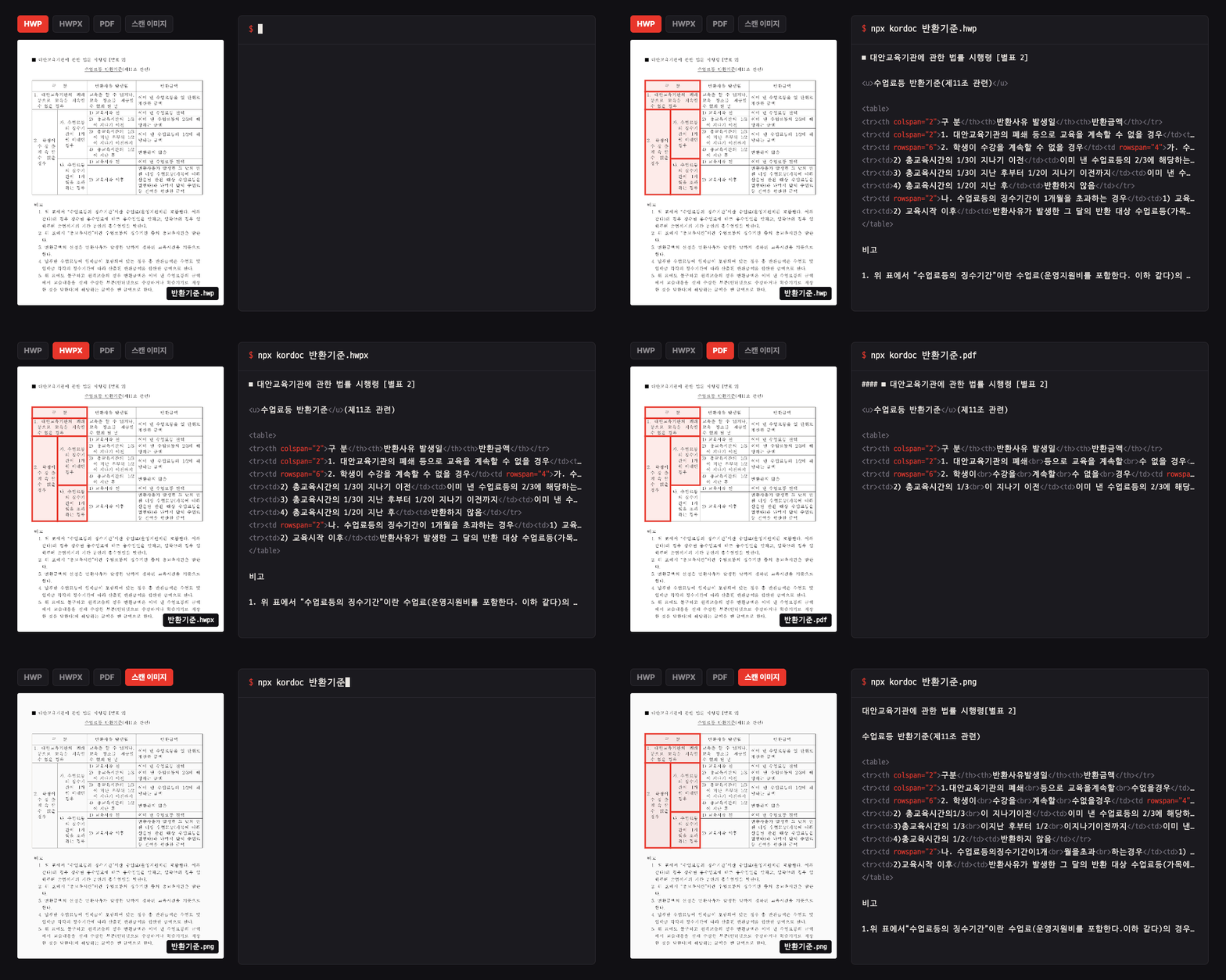
Actual output for one statute annex given as HWP, HWPX, PDF and a scanned image. All four read the merged cells (rowspan, colspan) into the same table structure. OCR turns on automatically for images.
- 📊 0.965 overall on the public PDF benchmark: opendataloader-bench, 200 documents, higher than the 12 parsers on the public leaderboard (as recorded on 2026-09-29; measured on 4.24.50). Measurement details
- 🇰🇷 100% Korean document table structure match: all 10,342 visible tables from 2,424 original HWPX documents. Validation
- 🧩 Published in the Claude plugin directory: 1,700+ installs (as of 2026-11-14). Also listed on the official MCP Registry.
If this saves you time, a GitHub ⭐ helps others find it.
Videos (Korean): public benchmark run (2026-09-27 cut, 1 min 31 sec) · batch form filling demo
Contents: Install · Quick start · Features · Validation · Recent updates · FAQ · Documentation and security
Install
Node.js 20+ · macOS / Linux / Windows
npm install kordocRun the CLI without installing it globally: npx kordoc. PDF text is read by a WebAssembly engine shipped in the package. OCR, image-format conversion and QR-reading dependencies are installed by default; omitting them with --omit=optional limits those features.
Connect an AI agent
| Where | How |
|---|---|
| Claude Desktop, Claude Code, Cursor, Codex and others | npx -y kordoc setup finds installed clients and registers the MCP server |
| VS Code, Cursor | Use the buttons below |
| Claude Code plugin | /plugin marketplace add chrisryugj/kordoc, then /plugin install kordoc@kordoc |
| Claude apps | Find kordoc in the plugin directory and install it |
| Other MCP clients | Official MCP Registry io.github.chrisryugj/kordoc or manual setup |


Restart the client to use 22 tools for parsing, comparison, generation, review, rendering and more. If registration fails, see manual MCP setup and installation troubleshooting.
Quick start
CLI
npx kordoc document.hwpx -o document.md
npx kordoc *.pdf --jobs 4 -d ./output
npx kordoc document.pdf --format json --pages 1-3
npx kordoc scan.pdf --ocr -o scan.md
npx kordoc generate report.md --preset report -o report.hwpx
npx kordoc to-hwpx document.hwp -o document.hwpx
npx kordoc to-hwpx ./old-docs   # whole folder (subfolders too): .hwpx next to each file, existing ones skipped
npx kordoc document.pdf -o document.hwpx   # PDF, DOCX and others become HWPX from what was read (images included)
npx kordoc pack build report1.hwpx report2.hwpx report3.hwpx --name Gwangyang -o gwangyang.kpack   # agency pack (docs/agency-pack-en.md)
npx kordoc generate new-report.md --pack gwangyang.kpack -o new-report.hwpx
npx kordoc fill --template gian -j values.json -o draft.hwpx
npx kordoc lint report.hwpx --gate --preset report
--jobs converts files in parallel and increases memory use. Batch conversion details
JavaScript / TypeScript
import { parse, markdownToHwpx } from "kordoc"
import { writeFile } from "node:fs/promises"

const result = await parse("document.hwpx")
if (result.success) {
  console.log(result.markdown)
  // result.blocks: structured data; result.metadata: document metadata
}

const hwpx = await markdownToHwpx("# Plan\n\nBody text", {
  gongmun: { preset: "report" },
})
await writeFile("report.hwpx", Buffer.from(hwpx))
Parse options, APIs, forms and rendering examples · From Python or Java: Python SDK, Java SDK
Features
- Read: Markdown, IR, page text, RAG chunks, local OCR (handwriting included), QR code values in images (
--qr-codes), one image format for all images (--image-format png|webp), chart data as tables and SmartArt as lists (--charts, HWP, HWPX, DOCX, PPTX, XLSX) - Compare and edit: Block/cell diffs, format-preserving HWPX/HWP patches, new content in a sample's format
- Create: Markdown → HWPX or HWP (HWP needs
npm install @rhwp/core, then-o doc.hwp), government-document presets, department templates (--template) and the look of a report PDF (--layout), TOC page numbers, tables, equations and charts - Convert: HWP 5.x → HWPX keeping its formatting (fonts, paragraph shapes, tables, pictures, shapes, equations, headers, footnotes, charts; distribution-protected and track-changes documents included). PDF, DOCX and others become HWPX from what was read with
-o document.hwpx - Agency packs: Build a house-style pack (
.kpack) from a few of your own agency documents and write new documents in that style - Fill forms: Fields, click-here controls, two draft templates and seal placement
- Review: Notation and public-language rules, structure and AI-writing gate, budget calculation checks, block-level lint for open documents (
lint-blocks) - View and protect: HWPX/HWP previews and region crops, PII masking (opt-in learned model for names and addresses,
--model)
Extract Markdown for format-preserving patches with --keep-layout-tables. Unsupported edits are skipped with a reason. Format-preserving editing · Full CLI reference
Validation
Results use fixed corpora and reference criteria. Measured on: default 4.22.14 (2026-10-19) · render layout and statute annexes 4.24.24 (2026-10-30) · HWP → HWPX conversion 4.24.29 (2026-10-31) · OCR 4.24.32 (2026-11-01) · PDF tables 4.24.35 (2026-11-01) · PDF text and opendataloader-bench defaults and OCR on 4.24.50 (2026-11-07) · KoOCR-Bench 4.24.68.
| Target | Population | Result |
|---|---|---|
| 4.25.31 | HWP 5.x patch also adds and removes body paragraphs and lines in cells with forced line breaks. Large-document patch alignment is exact now (Myers). Reads DOCX comments and endnotes, XLSX and XLS cell notes, XLSX and PPTX links, and XLS/XLSX text boxes. Feeding parse() output back no longer skips image cells |
HWP body paragraphs: 158 added, 145 removed (200 docs) · cell line edits 92 → 98 · notes 0 → 89 (XLSX 20, XLS 69, XLS 69/69 against the converted reference) · links 0 → 185 · skips on an unedited report 68 → 0 · score, formats, roundtrip, annex, gen: 0 drops |
| 4.25.30 | HWP 5.x patch adds and removes table cell lines (paragraphs) (#249). New lines become new paragraphs with the previous paragraph's shape, and the cell paragraph count and last-paragraph mark are kept in sync | Adding lines to HWP cells: skipped → applied in place · 92 corpus HWP 5.x edits: reparse matches 92, opens in rhwp 92 · 5,418 tests, 0 failures |
| 4.25.29 | patch no longer pushes a value typed into a blank bracket placeholder behind its spaces (#247) and rewrites the preview text from the edited body (#248, fill and sessions too). HWP 5.x cell edits that change the line count are reported as skipped instead of being glued onto the previous line (#249). <br> in body paragraphs of generate becomes a line break (#250). DOCX --charts also reads charts in table cells and text boxes |
Blank bracket: 27 leftover spaces → 0 · deleted lines left in the preview → gone · <br> in 9 presets: literal → line break · roundtrip 75 and gen 5 docs, 0 drops · 5,418 tests, 0 failures |
| 4.25.28 | --charts also reads Excel objects (OLE) in HWP/HWPX as sheet tables. The charts option is available in MCP parse_document and the Python and Java SDKs. Empty picture frames no longer raise a skipped-image warning |
Excel objects in 2 HWP docs: 0 → 3 tables · option on vs off over 4,353 docs: 0 errors, 0 changes outside chart/Excel blocks · default output: score 5,465, formats 146, annex 544 docs, 0 drops · false warnings in 199 HWPX docs → 0 |
| 4.25.27 | --charts (charts: true) reads chart data as tables and SmartArt as lists in HWP, HWPX, DOCX, PPTX and XLSX. Chart text used to be dropped. Off by default, so default output is unchanged |
161 docs with chart parts: chart text recall 0.172 → 1, numbers 0.058 → 1 · 28 HWP/HWPX chart pairs give identical output · default output: score 5,465, formats 146, annex 544 docs, 0 drops |
| HWPX | 2,424 documents · 10,342 tables | Table structure match 10,342/10,342 · 100% |
| HWP 5.x ↔ HWPX | 1,130 pairs · 4,315 tables | Paired-document table structure match 100% |
| HWP 5.x → HWPX conversion | 264 pairs saved by Hangul (232 compared attribute by attribute) | Attribute match 99.21% · exact 69/232 · text 264/264 · 80 documents checked side by side in Hangul |
| PDF text | 744 pairs | Character recall 99.887% · precision 99.685% · reading order 99.398% · word-boundary F1 99.131% |
| PDF tables | 708 pairs · 2,331 tables | Detection 99.83% · structure match 98.24% · cell F1 0.9919 |
| HWPX reflow | 25,187 multiline paragraphs (12 folders) | All line starts match 24,941/25,187 · 99.02% |
| Nested PDF tables (text layer) | 29 documents · 101 tables | Structure and cell content 101/101 · 100% |
| Statute annexes | 272 documents · 346 tables | HWP 346/346, PDF 343/346 · 99.13% |
| All PDFs | 1,729 scored out of 1,911 documents | Text coverage 99.80% |
| OCR | 53 documents · 102 pages · 65 tables | CER 0.0237 · character recall 99.33% · table structure 33/65 |
| KoOCR-Bench v2.0c (external) | public 877 pages (tables, text, handwriting, order) | total 0.906 by default · tables 0.916 · handwriting 0.921 · order 0.914 · heading recall 0.930 |
| opendataloader-bench | 200 PDF documents | Overall 0.965 with defaults · 0.967 with ocr: true · 0.939 with OCR off (4.22.14) |
| HWPX render layout | 1,565 Hancom PDF pairs (1,508 with matching page counts) · 111,480 text runs · 4,300 images | Text position (±1.5pt) 106,904 · 95.9% · image position (±2pt) 4,213 · 98.0% |
Table structure, cell content and visual fidelity are separate metrics. The nested-table 100% applies only to these 101 tables, not all PDF parsing or page layout. See benchmark details for scope, exclusions, per-option scores and reproduction.
Recent updates
Latest release: 4.25.31 · 2026-11-28
| Version | What changed | Measured change |
|---|
See the changelog for earlier releases and details.
FAQ
How do I convert an HWP or HWPX file to Markdown?
Run npx kordoc document.hwp -o document.md. It reads the file directly, without Hancom Office. Convert many files at once with npx kordoc *.hwpx -d ./output.
How do I let Claude, Cursor or another AI agent read Korean documents?
Run npx -y kordoc setup to register the MCP server. The agent can then read, compare and fill HWP, PDF and Excel files from a file path.
Does it work on an air-gapped network?
Yes. KORDOC_OFFLINE=1 blocks all outbound traffic, and OCR runs on the local CPU with no API key. Offline deployment
Can I use it for RAG indexing?
--format chunks emits structure chunks with heading breadcrumbs plus standalone table chunks. Use --table-format gfm (API: tableFormat: "gfm") for tables without HTML. From Python or Java, use the Python SDK or Java SDK.
Can I get OCR line boxes or use another model?
--ocr --ocr-lines --format json exports line boxes and confidence (plus ranked readings with probabilities per line with --ocr-line-candidates 3, and per-character confidence, box and alternatives with --ocr-chars 3); --ocr-det and --ocr-det-long-side select the detector and resolution, and --ocr-rec handwriting|auto selects the handwriting recognizer. --page-images png also returns the page the OCR path read as an image. OCR lines and models
Documentation and security
- Usage guide: complete CLI, MCP tools, APIs and format support
- Java SDK · Python SDK: parse from Java and Python systems through a resident engine worker (worker protocol, Korean)
- Government-document generation · Architecture
- Offline deployment:
KORDOC_OFFLINE=1; MCP file scope withKORDOC_ROOT - gVisor sandbox: run the parser inside gVisor to protect the host (Linux;
KORDOC_SANDBOX=gvisorordocker --runtime=runsc, Korean) - Security policy · MIT license · Third-party notices
Star History
About the Author
A local civil servant in Korea. Built this after seven years of wrestling HWP files at the Gwangjin-gu District Office in Seoul. Validated on thousands of real government documents across five public-sector projects.
License: MIT